


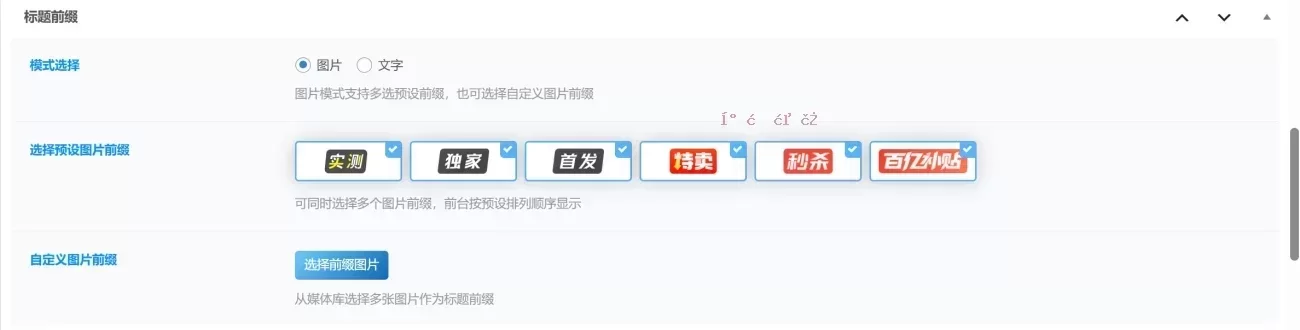
本文提供一套完整的子比主题自定义文章前缀代码,支持图片和文字两种模式,并集成到文章编辑器中。代码直接添加到主题根目录的func.php文件(或functions.php)即可生效。
这套代码利用了WordPress的钩子机制,能灵活地为每篇文章添加个性化前缀标签。对于使用子比主题的站长来说,可以快速实现类似“独家”、“首发”等标识,提升文章列表的视觉层次感。
核心代码实现
将以下PHP代码完整复制到主题的func.php或functions.php中。代码定义了前缀图片数组、元数据字段、以及在前台标题中渲染前缀的核心逻辑。
// 如果!定义('ABSPATH')) {退出;}
功能dearlicy_prefix_images(){
返回数组(
'shice' => 'https://free.boltp.com/2026/05/02/69f5fe72696d4.webp',
'独家'=>'https://free.boltp.com/2026/05/02/69f5fe7207395.webp',
'shoufa' => 'https://free.boltp.com/2026/05/02/69f5fe71e6136.webp',
'temai' => 'https://free.boltp.com/2026/05/02/69f5fd9865b63.webp',
'妙沙'=>'https://free.boltp.com/2026/05/02/69f5fd994a40e.webp',
'baiyibutie' => 'https://free.boltp.com/2026/05/02/69f5fd9a0af79.webp',
);
}
如果(!class_exists('DearLicy_Module')) {
DearLicy_Module类
{
公共静态函数 DearLicy_imgtitle($images = 数组())
{
返回array_merge($images, dearlicy_prefix_images());
}
}
}
如果 (class_exists('CSF')) {
CSF::createMetabox('DearLicy_titles', array(
'title' => '标题前缀',
'post_type' => 'post',
'上下文' => '高级',
'data_type' => 'unserialize',
'优先级'=>'高',
));
CSF::createSection('DearLicy_titles', array(
'fields' =>数组(
数组(
'id' => 'titles_moshi',
“类型” => “无线电”,
'title' => '模式选择',
'desc' => '图片模式支持多选预设前缀,也可选择自定义图片前缀',
'inline' =>真,
'options' =>数组(
'img' => '图片',
'text' => '文字',
),
'默认' => 'img',
),
数组(
'id' => '文本',
'type' => 'text',
'title' => '文字模式',
'desc' => '建议两个字',
'dependency' => 数组('titles_moshi', '==', 'text'),
),
数组(
'id' => 'text_bg_color',
'类型'=>'调色板',
'标题'=>'背景颜色',
'desc' => '部分颜色带有文字颜色,其余默认白色',
“类” => “紧致肤色”,
'default' => 'jb-vip2',
'options' => class_exists('CFS_Module') ?CFS_Module::zib_palette(array(), array('jb'))) : array(),
'dependency' => 数组('titles_moshi', '==', 'text'),
),
数组(
'id' => 'img',
'类型' => 'image_select',
'title' => '选择预设图片前缀',
'desc' => '可同时选择多个图片前缀,前台按预设排列顺序显示',
“多重”=>真,
'options' => dearlicy_prefix_images(),
'dependency' => 数组('titles_moshi', '==', 'img'),
),
数组(
'id' => 'custom_img_prefixes',
'类型'=>'画廊',
'title' => '自定义图片前缀',
'desc' => '从媒体库选择多张图片作为标题前缀',
'add_title' => '选择前缀图片',
'edit_title' => '编辑前缀图片',
“clear_title” => “清空前缀图片”,
'dependency' => 数组('titles_moshi', '==', 'img'),
),
),
));
}
函数 dearlicy_get_selected_prefix_keys($value){
如果 (empty($value)) {
返回数组();
}
$keys = is_array($value) ? $value : array($value);
$keys = array_map('sanitize_key', $keys);
返回 array_values(array_intersect(array_keys(dearlicy_prefix_images()), $keys));
}
函数 dearlicy_get_custom_prefix_urls($value){
如果 (empty($value)) {
返回数组();
}
$urls = 数组();
foreach ((is_array($value) ? $value : explode(',', $value)) 作为 $item) {
$attachment_id = is_array($item) ? absint($item['id'] ?? 0) : absint($item);
$url = $attachment_id ? wp_get_attachment_image_url($attachment_id,'full') : '';
如果(!$url & is_array($item) & !empty($item['url'])) {
$url = $item['url'];
}
如果(!$url && is_string($item) && filter_var($item, FILTER_VALIDATE_URL)) {
$url = $item;
}
如果($url) {
$urls[] = esc_url_raw($url);
}
}
返回 array_values(array_filter(array_unique($urls)));
}
函数 dearlicy_prefix_img($url, $alt = “前缀”){
还给$url? '![图片[1]-子比主题自定义文章前缀功能:PHP代码实现与WordPress配置指南]() ' : '';
}
函数 dearlicy_title_prefix_html($post_id){
如果 (get_post_meta($post_id, 'titles_moshi', true) === 'text') {
$text = get_post_meta($post_id,'文本',真);
$color = get_post_meta($post_id, 'text_bg_color', true);
返回$text === “'? '' : '。” esc_html($text) '';
}
$html ='';
$images = dearlicy_prefix_images();
$selected = dearlicy_get_selected_prefix_keys(get_post_meta($post_id, 'img', true));
foreach($selected as $key) {
$html .= dearlicy_prefix_img($images[$key], $key);
}
foreach (dearlicy_get_custom_prefix_urls(get_post_meta($post_id, 'custom_img_prefixes', true)) 作为 $index => $url) {
$html .= dearlicy_prefix_img($url,“custom 前缀-”。 ($index + 1));
}
返回$html;
}
函数 dearlicy_is_main_posts_list_title($post_id){
全局 $wp_query;
如果 (!$wp_查询实例 WP_Query ||!$wp_query->in_the_loop ||empty($wp_query->post->ID)) {
返回 false;
}
如果 ((int) $wp_query->post->ID !== (int) $post_id) {
返回 false;
}
foreach (debug_backtrace(DEBUG_BACKTRACE_IGNORE_ARGS, 8) 作为$trace) {
如果(!empty($trace['function']) && $trace['function'] === 'zib_get_posts_list_title') {
返回真;
}
}
返回 false;
}
函数 dearlicy_should_apply_title_prefix($post_id){
如果 (!$post_id || is_admin() || is_singular() || is_feed() || get_post_type($post_id) !== 'POST') {
返回 false;
}
返回 dearlicy_is_main_posts_list_title($post_id);
}
函数 apply_dearlicy_prefixes_to_title($title, $id = 零){
如果(!dearlicy_should_apply_title_prefix($id)) {
返回$title;
}
$prefix = dearlicy_title_prefix_html($id);
返回$prefix?$prefix . $title : $title;
}
add_filter(“the_title”,“apply_dearlicy_prefixes_to_title”,10,2);
功能dearlicy_title_prefix_admin_style(){
$screen = function_exists('get_current_screen')? get_current_screen() : null;
如果(!$screen || $screen->post_type!== 'post') {
回归;
}
?>
#DearLicy_titles .csf-field-image_select .csf--image { 边距:0 8px 8px 0;垂直对齐:顶部;
}
#DearLicy_titles .csf-field-image_select figure {宽度:112px;高度:42像素;显示:Inline-Flex;对齐物品:中心;正义内容:中心;填充:6px 8px;盒子尺寸:边框盒;边界半径:4px;
}
#DearLicy_titles .csf-field-image_select img {宽度:自动;高度:自动; 最大宽度:100%; 最大身高:100%;显示:方块;
}
<?php
}
add_action('admin_head-post.php', 'dearlicy_title_prefix_admin_style');
add_action('admin_head-post-new.php', 'dearlicy_title_prefix_admin_style');
' : '';
}
函数 dearlicy_title_prefix_html($post_id){
如果 (get_post_meta($post_id, 'titles_moshi', true) === 'text') {
$text = get_post_meta($post_id,'文本',真);
$color = get_post_meta($post_id, 'text_bg_color', true);
返回$text === “'? '' : '。” esc_html($text) '';
}
$html ='';
$images = dearlicy_prefix_images();
$selected = dearlicy_get_selected_prefix_keys(get_post_meta($post_id, 'img', true));
foreach($selected as $key) {
$html .= dearlicy_prefix_img($images[$key], $key);
}
foreach (dearlicy_get_custom_prefix_urls(get_post_meta($post_id, 'custom_img_prefixes', true)) 作为 $index => $url) {
$html .= dearlicy_prefix_img($url,“custom 前缀-”。 ($index + 1));
}
返回$html;
}
函数 dearlicy_is_main_posts_list_title($post_id){
全局 $wp_query;
如果 (!$wp_查询实例 WP_Query ||!$wp_query->in_the_loop ||empty($wp_query->post->ID)) {
返回 false;
}
如果 ((int) $wp_query->post->ID !== (int) $post_id) {
返回 false;
}
foreach (debug_backtrace(DEBUG_BACKTRACE_IGNORE_ARGS, 8) 作为$trace) {
如果(!empty($trace['function']) && $trace['function'] === 'zib_get_posts_list_title') {
返回真;
}
}
返回 false;
}
函数 dearlicy_should_apply_title_prefix($post_id){
如果 (!$post_id || is_admin() || is_singular() || is_feed() || get_post_type($post_id) !== 'POST') {
返回 false;
}
返回 dearlicy_is_main_posts_list_title($post_id);
}
函数 apply_dearlicy_prefixes_to_title($title, $id = 零){
如果(!dearlicy_should_apply_title_prefix($id)) {
返回$title;
}
$prefix = dearlicy_title_prefix_html($id);
返回$prefix?$prefix . $title : $title;
}
add_filter(“the_title”,“apply_dearlicy_prefixes_to_title”,10,2);
功能dearlicy_title_prefix_admin_style(){
$screen = function_exists('get_current_screen')? get_current_screen() : null;
如果(!$screen || $screen->post_type!== 'post') {
回归;
}
?>
#DearLicy_titles .csf-field-image_select .csf--image { 边距:0 8px 8px 0;垂直对齐:顶部;
}
#DearLicy_titles .csf-field-image_select figure {宽度:112px;高度:42像素;显示:Inline-Flex;对齐物品:中心;正义内容:中心;填充:6px 8px;盒子尺寸:边框盒;边界半径:4px;
}
#DearLicy_titles .csf-field-image_select img {宽度:自动;高度:自动; 最大宽度:100%; 最大身高:100%;显示:方块;
}
<?php
}
add_action('admin_head-post.php', 'dearlicy_title_prefix_admin_style');
add_action('admin_head-post-new.php', 'dearlicy_title_prefix_admin_style');
CSS样式代码
将以下CSS添加到主题的自定义样式区域或style.css中。这段样式为文字前缀标签添加了独特的斜角裁剪和扫光动画效果,让标签更具视觉冲击力。
. DearLicy_prefix{
位置:亲属;溢出:隐藏;显示:Inline-Flex;对齐物品:中心;边界半径:5px;缓冲:5px 4px;右边距:3px;高度:19像素;字体大小:12px;顶部:-3个点; 剪辑路径:多边形(7% 0, 99% 0, 93% 100%,0 100%);
}
.DearLicy_prefix:之后,DearLicy_prefix:之后{
位置:绝对;内容:" ";显示:方块; 左:-100%;顶部:-5个百分比;宽度:15px; 身高:145%;  背景图像:线性渐变(90度,RGBA(255, 255, 255, 0),RGBA(255,  0.5),RGBA(255), 255, 255, 0)); 动画:扫频 第三标题逐步进 出无限; 变换:旋转(28度));
}
@keyframes 横扫标题{
    0% { 左:-100%    }
    100% { 左:100%    }
}
通过这套代码,你可以为子比主题的每篇文章设置独特的自定义文章样式。无论是使用预设图片还是自定义图片,都能轻松实现。这套文章前缀功能不仅增强了文章的可读性,还能让分类标识一目了然,提升用户浏览体验。
常见问题FAQ
问:代码添加后没有效果,可能是什么原因?
答:请检查代码是否完整复制到func.php或functions.php中,并确保没有语法错误。同时,确认主题已启用CSF框架(Codestar Framework),因为代码依赖该框架创建元数据字段。
问:如何修改预设的图片前缀?
答:在代码的dearlicy_prefix_images()函数中,直接修改数组的键名和对应的图片URL即可。键名会在后台编辑器中作为选项显示。
问:前台只显示文字模式,图片模式不显示?
答:检查CSS样式是否已正确添加。另外,确认在文章编辑器中选择了“图片”模式,并至少勾选了一个预设图片或上传了自定义图片。
问:能否在分类页或标签页也显示前缀?
答:当前代码通过dearlicy_should_apply_title_prefix()函数限制仅在文章列表的主循环中生效。如需扩展,可修改该函数的判断逻辑。
问:文字前缀的扫光动画可以去掉吗?
答:可以。在CSS中删除或注释掉.DearLicy_prefix:after和@keyframes 横扫标题部分即可。
相关阅读: 自定义文章前缀








请登录后查看评论内容